Top product management workflow challenges (and how to solve them)
Strong product management workflows don’t just track tasks—they also create shared understanding as ideas turn into shipped features.
At their best, these workflows connect discovery, planning, execution, and feedback to keep decisions visible and teams aligned as priorities shift. After all, when context—like why you made a tradeoff, what changed, and what’s blocked—moves alongside the work, your product teams will spend less time re-explaining and more time building with confidence.
While most teams already generate this context every day across docs, meetings, and tools, the challenge lies in bringing it together into a workflow that reflects how product work actually happens and using it to move faster without losing clarity.
What is a product management workflow?
A product management workflow is the system that connects insight to execution. It’s how user feedback becomes a decision, how that decision turns into a plan, and how that plan moves through delivery from end to end.
Good workflow management makes context readily available without adding more steps or ceremony. That’s because when documentation, decisions, and tasks live together and update as the work evolves, teams can move faster without revisiting the same assumptions or debates at every handoff.
What does a product management workflow include?
While every team implements them differently, most effective workflows include these core elements:
Inputs and insights: Customer feedback, research, and market signals
Decision artifacts: Tradeoffs, priorities, and rationale
Planning structures: Roadmaps, milestones, and scoped work
Execution layers: Tasks, ownership, and timelines
Feedback loops: Learnings from delivery and customer feedback
What’s important here is continuity, not perfection. In other words, each layer should inform the next without forcing teams to recreate context.
How do workflows help product teams stay aligned?
Workflows keep teams aligned by giving them a clear picture of the project’s status at every step of the way. After all, when decisions, assumptions, and ownership are clear from the start, you can catch risks and disagreements before they turn into late-stage rework.
As Ryan M. Berg puts it, “Rework is work you already paid for once. It is time you invested in a direction that you later abandoned […] because the original work contained defects in thinking, defects in alignment, or defects in ownership.” Workflows instead give teams what Berg calls “truth speed” so everyone knows what’s happening and why.
In practice, this means fewer stalled handoffs, fewer surprise course corrections, and less time reconciling different interpretations of “what we agreed on.” That way, alignment becomes natural, not something that PMs have to chase.
What does a strong product management workflow look like end to end?
A strong product management workflow mirrors how product teams operate without forcing context to jump between tools. That means each phase builds on the last so insights flow into plans, plans turn into execution, and launches create learning that informs what’s next.
When research, planning, and delivery live in one connected workflow management system, you’ll spend less time translating work for different audiences and more time making progress together. Notion supports this goal by giving you flexible building blocks—like projects, docs, databases, and templates—that adapt to Agile workflows without locking you into rigid processes.
Here are the components of a successful product management workflow:
Research and discovery
Early product work is about exploration—gathering signals, pressure-testing assumptions, and clarifying where real opportunity exists.
To make this process easier, you can use Notion to anchor discovery work directly to the initiatives it informs. That way, research notes, interview summaries, early hypotheses, and open questions stay with the project itself rather than floating in separate tools. This structure makes it easier to connect emerging insights to planning without formalizing them too early or losing nuance along the way.
Prioritization and planning
When your insights are clear, it’s time to turn them into a plan that you can execute. That means prioritizing opportunities, defining scope, sequencing work, and making tradeoffs explicit before delivery begins.
This kind of effective planning brings multiple signals together to balance impact and effort, align initiatives to goals, set sprint or milestone boundaries, and clarify ownership so you don’t need to revisit decisions downstream. When this context stays visible, planning conversations will then move forward instead of circling back to the same questions.
From there, your product backlog becomes a reflection of those decisions, not the starting point, to capture what’s next. Meanwhile, goals, timelines, and decision notes explain why it matters.
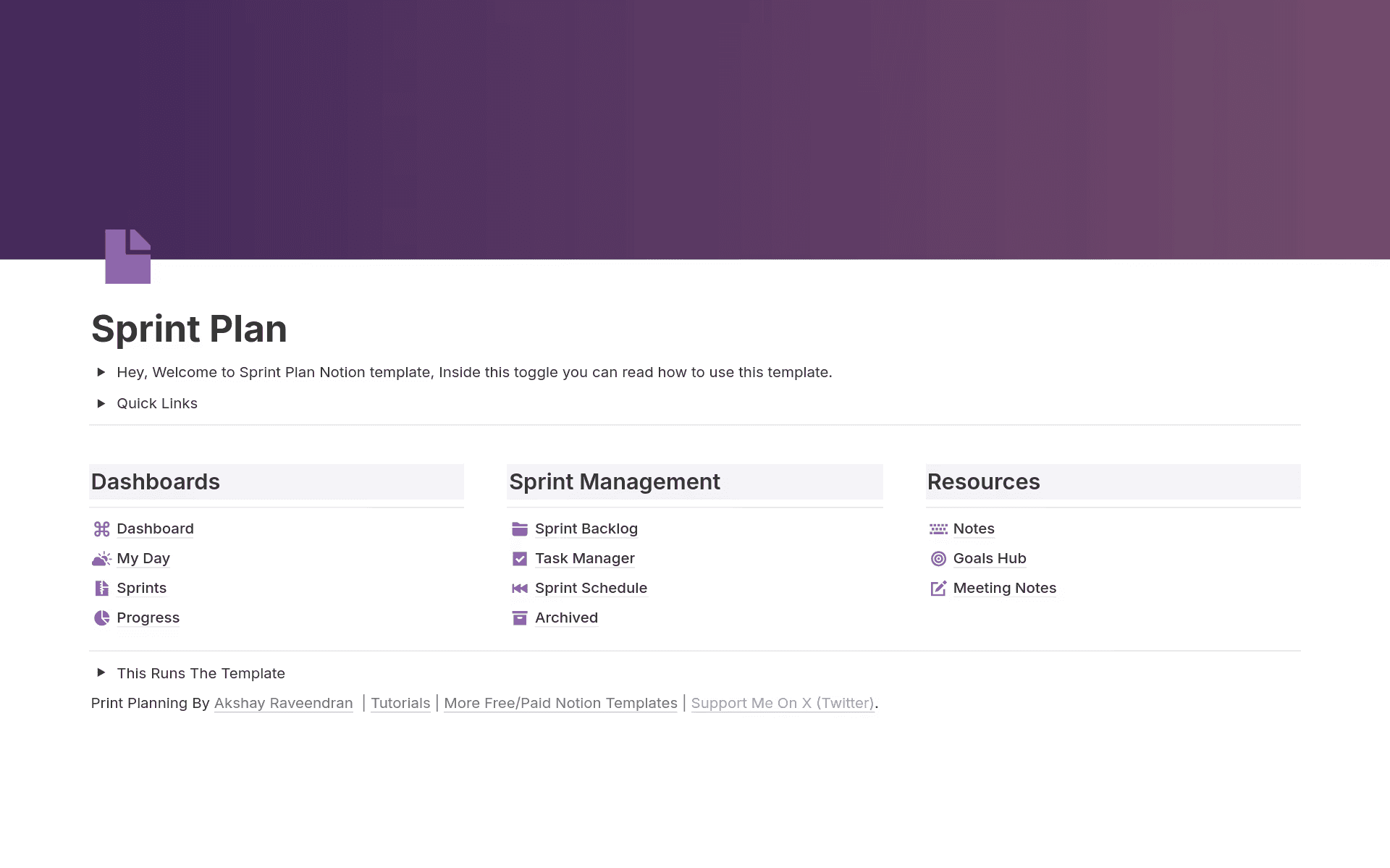
A Sprint Plan page based on the Backlog Management template in Notion (Source)

Template
For structured planning cycles, check out the Backlog Management template in Notion to help you organize priorities, review work in progress, and move cleanly from planning into execution.
Roadmapping
Product roadmaps translate priorities and product vision into a shared plan for new product development. This helps you understand sequencing, dependencies, and what success looks like over time.
A useful roadmap also translates strategy into an executable plan, accounts for dependencies, and presents work in a way that different audiences can rely on. When the roadmap stays anchored to active work in this way, it evolves as conditions change and reflects real progress rather than outdated assumptions.
In Notion, product roadmaps stay flexible and current with multiple views of plans. For instance, you can zoom out for long-term direction or zoom in on near-term delivery without fragmenting the source of truth.
Template
For more inspiration, check out these 10 product roadmap templates that support different planning styles and product ownership needs.
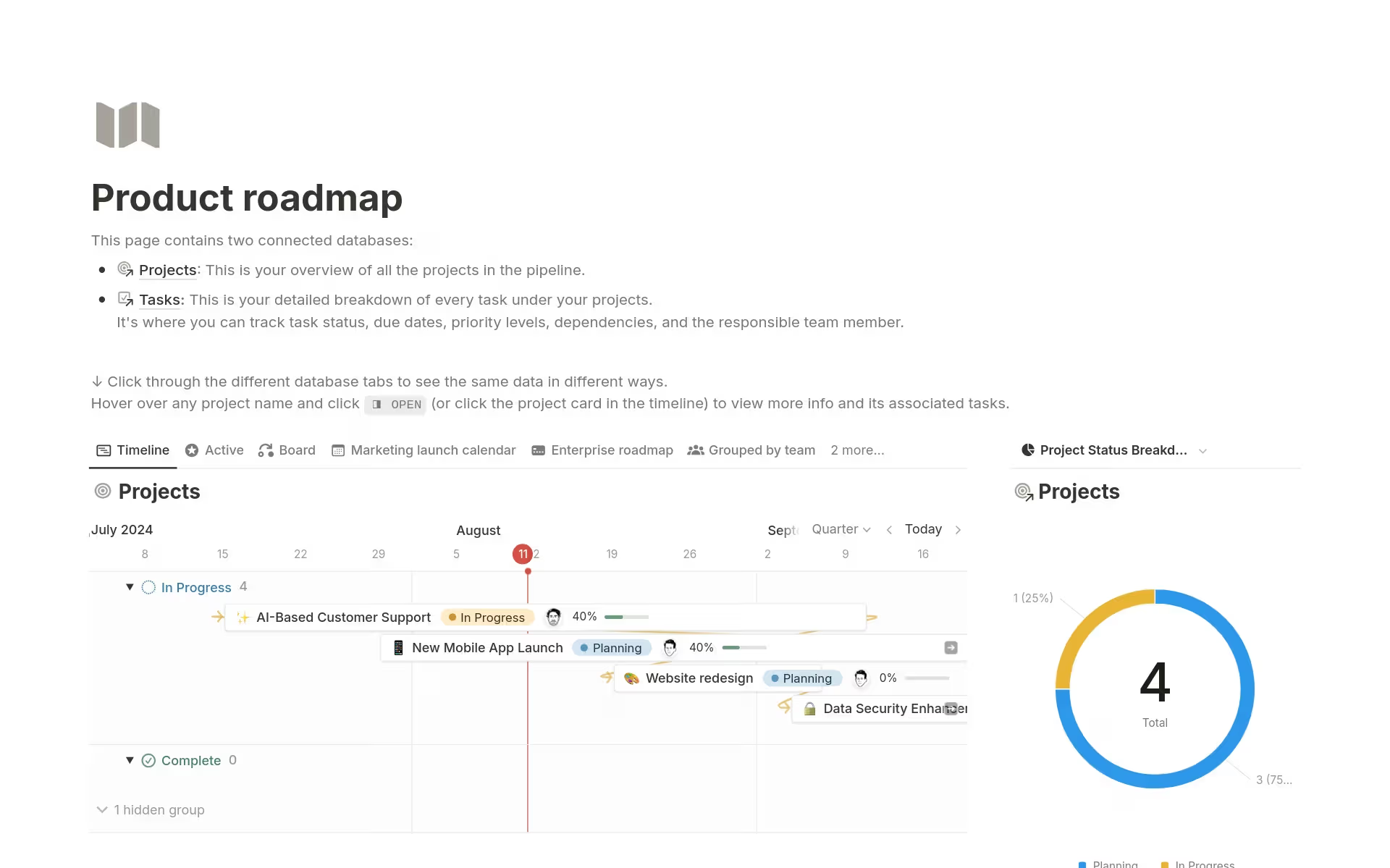
The Product Roadmap Notion template for outlining project phases (Source)
Execution
Execution is where product strategy meets reality. During this stage, design, engineering, and cross-functional stakeholders rally around shared priorities, clear ownership, and a steady delivery cadence. But when that alignment breaks down, execution slows—even if everyone is working hard.
When you have strong execution workflows in place, though, your teams can all work off the same information, which means that work stays connected to decisions, dependencies stay visible, and stakeholders understand progress without relying on constant syncs or status updates. This reduces friction across handoffs and helps teams move forward together, even as plans evolve.
To see this in practice, take a look at how Notion built a product management system to align every team—from planning through delivery—without adding process overhead.
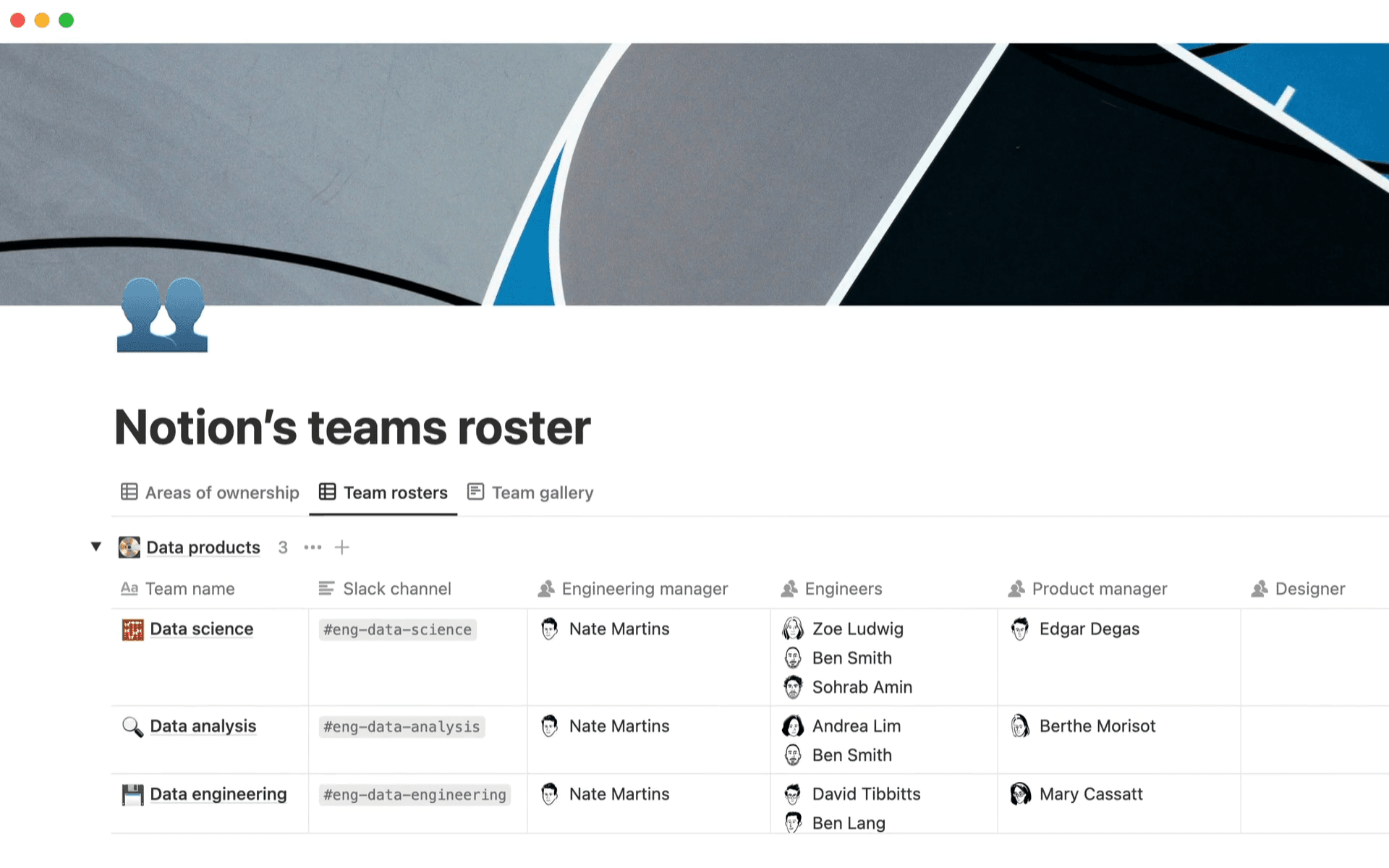
Notion’s teams roster database, in order of team names (Source)
Learning and iteration
Launch isn’t the finish line—it’s where learning begins. That’s because after release, you still need to understand what worked, what didn’t, and what to change next. To do this, you’ll track metrics, capture qualitative feedback, and revisit earlier decisions so you can optimize and iterate with intention. After all, when insights stay connected to the work that produced them, each cycle becomes a continuation of the previous one instead of a brand-new conversation.
Here, shared artifacts like KPI tracker templates can help you monitor performance and tie outcomes back to specific initiatives, which makes decision-making more grounded and repeatable. Over time, this then turns product launches into inputs for smarter planning, sharper execution, and more confident iteration.
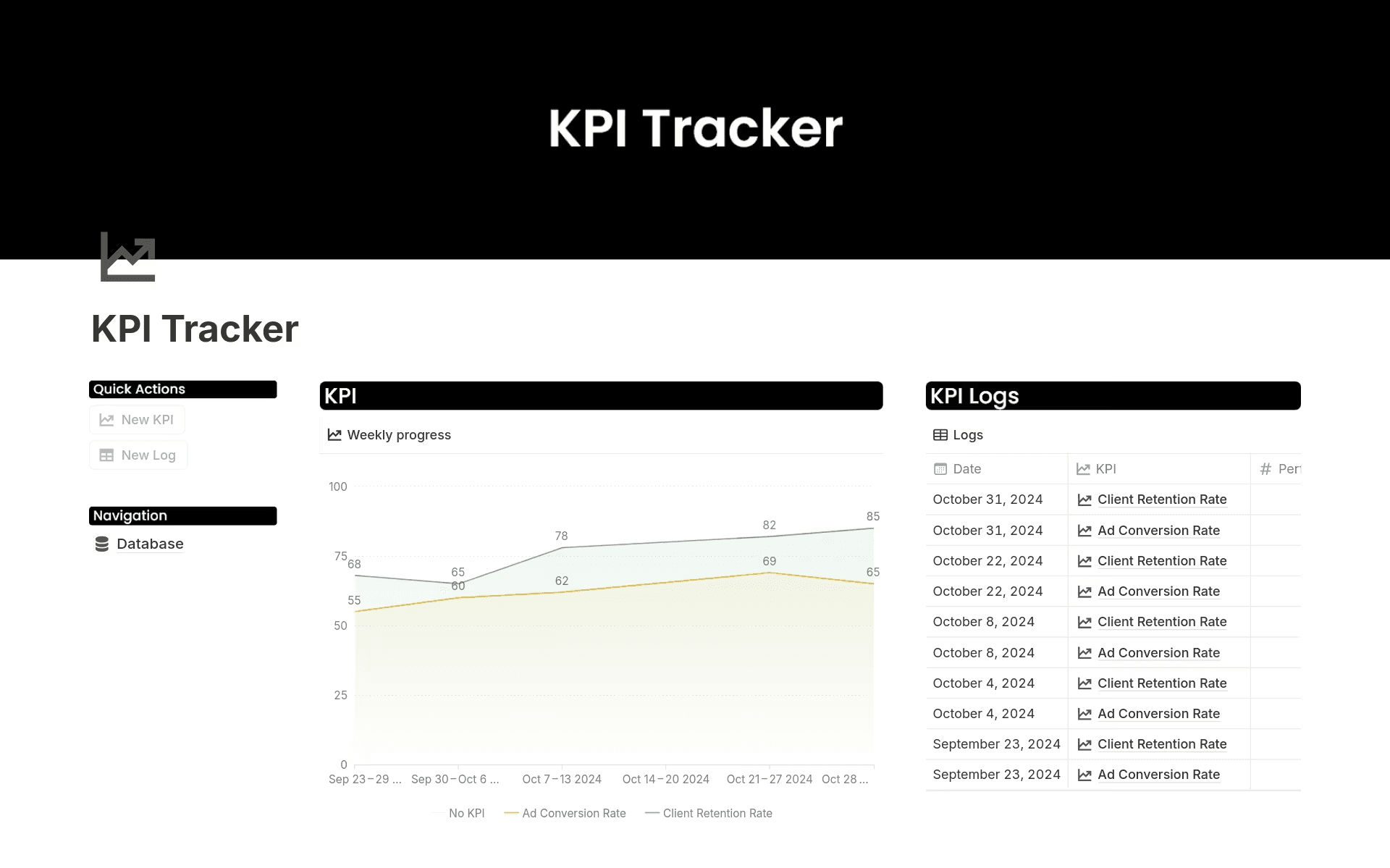
A KPI tracker template with a chart and logs in Notion (source)

Helpful Resource
If you’re ready to delve deeper, explore Notion’s collection of project management guides for more practical ways to refine how you plan, track, and improve your work.
How to build a product management workflow with Notion AI
A connected workspace, along with thoughtful automation, can help you reduce friction across the product lifecycle and stay focused on strategic goals. Here’s a practical, six-step workflow to help you put that process into motion:
1. Centralize research, feedback, and customer insights
To start, you’ll want to create a centralized product development hub where research, feedback, and conversations live together. This gives you a single place to track insights instead of chasing them across tools.
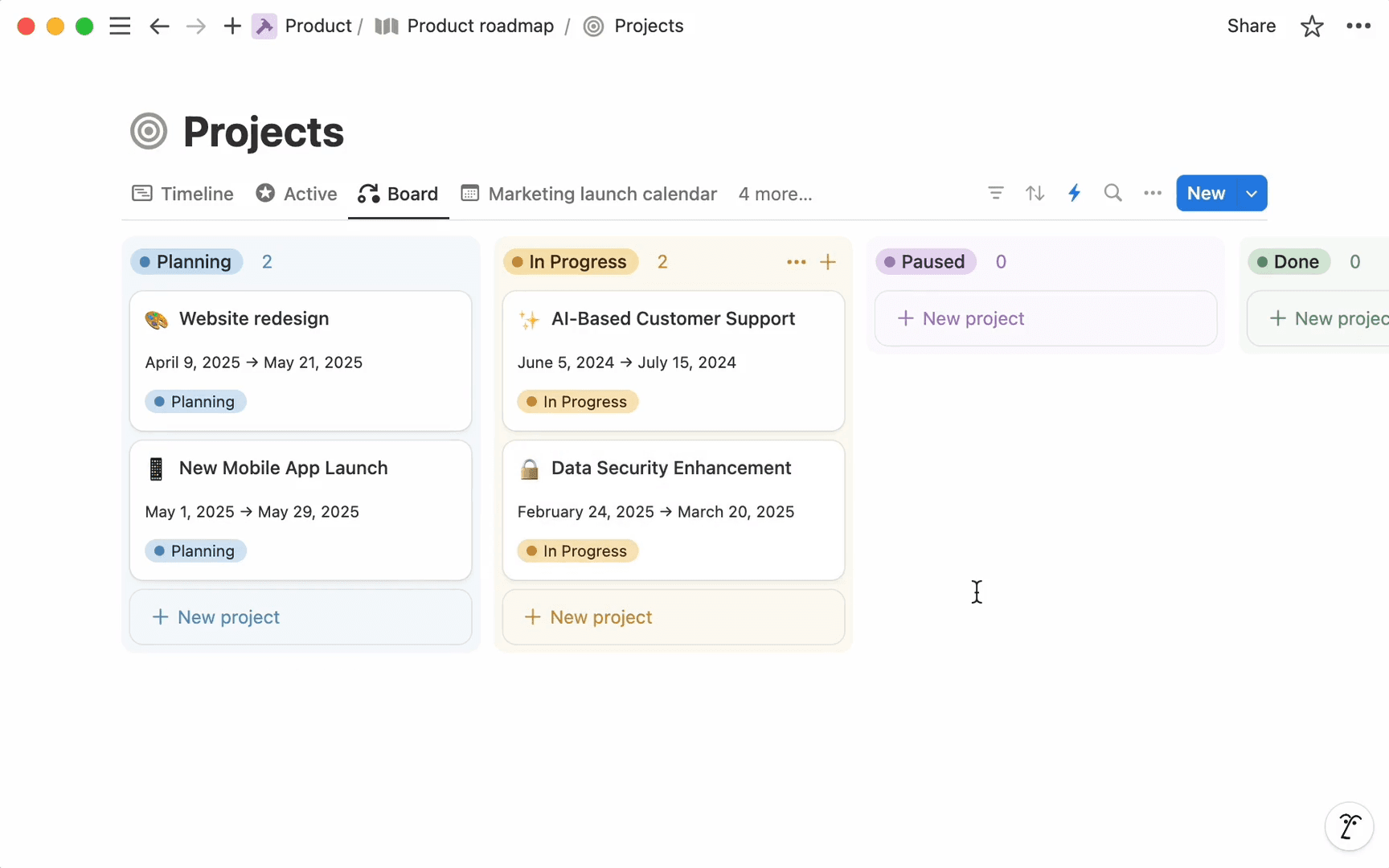
A Projects board in Notion that shows projects by status across teams (Source)
With Notion, you can then layer AI into that hub to summarize meeting notes, pull key takeaways from interviews, and surface patterns across customer feedback. AI meeting notes can also help you capture decisions and signals as they happen so early context doesn’t disappear before planning begins.
2. Turn insights into product themes and priorities
Once insights accumulate, the challenge shifts from collection to sense-making. At this stage, connecting product ideas, feedback, and requests into clear themes can inform what you build next.
Notion AI is useful here because it can find answers across your workspace and connected apps so you can see what’s changing, what’s blocked, and which product features need attention. Gone are the days of manually synthesizing updates—now, you can generate summaries, create action items, and keep priorities aligned as new information comes in.
Uh-oh! It looks like your ad blocker is preventing the video from playing.
Please watch it on YouTube

3. Draft PRDs and specifications that stay tied to the work
As priorities take shape, it’s essential to translate them into clear requirements that your development team can act on. To help with this, you can use Notion to build product requirements documents (PRDs) that are visible to your entire team. But keep in mind that these specifications work best when they remain tied to feature requests, decisions, and supporting context.
Using AI to draft or refine your PRD speeds the process up without stripping away nuance. To start, you can use existing notes or discussions, then iterate with input from engineering and design while keeping everything anchored to the same source of truth. This makes it easier to adjust scope and keep clarity intact.
4. Build a roadmap that adapts as new information emerges
Roadmaps should communicate direction, not lock you into assumptions. But as customer needs shift or constraints change, your roadmap also needs to adapt without creating confusion.
With AI-assisted updates and connected planning, you can adjust sequencing and timelines while keeping business goals front and center. That way, the roadmap evolves as reality changes rather than lagging behind it.
5. Connect execution workflows to your roadmap
For best results, you’ll want to connect execution directly to your determined plan. Otherwise, when tasks drift away from roadmap context, you’ll lose sight of why the work matters.
Your personal Notion Agent can help you streamline this execution by drafting status updates, flagging changes that affect dependencies, and keeping stakeholders informed without constant manual reporting. That association reduces handoff friction and keeps delivery aligned with intent.
Uh-oh! It looks like your ad blocker is preventing the video from playing.
Please watch it on YouTube
6. Capture learnings and fold them back into discovery
After launch, learning needs to travel fast. To assist in this process, metrics, feedback, and outcomes should inform the next cycle, not sit in isolated reports.
Creating AI summaries make it easier to capture these insights and feed them back into discovery. That’s because Notion AI highlights patterns, surfaces open questions, and turns outcomes into inputs for smarter decision-making. Over time, this creates a tighter loop between what you ship and what you build next.
4 challenges in effective product management workflows—and how to solve them
Modern product teams face increasing pressure to move faster without losing clarity. But that doesn’t mean adding more tools—instead, you need to introduce intelligence where workflows already break down.
According to McKinsey’s Global Survey on AI, more than 70 percent of organizations expect to increase their investment in AI, which reflects a broader move toward embedding AI directly into day-to-day workflows. The takeaway is clear: AI is becoming a practical lever for reducing friction, surfacing context earlier, and supporting better decisions—without adding operational overhead.
Here are four challenges that often negatively impact product management teams, along with what you can do to rectify them:
1. Fragmented information slows down decisions
When insights, specs, and updates live across too many tools, decisions slow down and important details slip through the cracks.
Fixing this issue starts with consolidation. To do this, use verified docs and connected databases alongside AI retrieval to find answers quickly and keep decisions tied to what’s current.
2. Roadmaps and plans become outdated quickly
Even well-crafted plans lose relevance as tasks move forward and priorities shift. But to ensure that roadmaps still reflect reality, you’ll want to keep tasks linked to plans and use automated status updates via the Notion Agent. Surfacing changes as they happen also makes it easier to adjust sequencing, timelines, and expectations.
3. Teams struggle to keep context aligned across engineering, product, and design
Cross-functional teams often work from different interpretations of the same plan. That’s because decisions happen in meetings, tradeoffs go undocumented, and intent goes missing as work moves downstream.
Creating shared docs, product decision logs, and AI meeting notes helps teams instead preserve context across roles. As Notion solutions engineer Peter Escartin puts it, “Notion AI is most effective when it has all context. […] It becomes the source of truth for all project work—from tasks, documents, meeting notes, and external sources.”
With that foundation, AI can route work, surface risks, and keep teams aligned as plans evolve.
4. Research is hard to index, remember, or apply across cycles
Research often feels useful in the moment, then disappears when the next cycle begins. As a result, teams must relearn the same lessons because insights stay scattered or poorly indexed.
By instead organizing research in one place, tagging user feedback, and using AI summaries, teams can make sure that insights stay accessible and actionable. Each cycle will then build on the last, which turns discovery into a compounding asset.
Building a product management workflow that grows with your team
Connecting insights, decisions, and execution means you’ll spend less time reconciling work and more time building what matters. And as teams grow, this clarity becomes a competitive advantage because the ability to validate assumptions early, stay close to user needs, and carry context across cycles helps you move faster without losing focus. It also gives team members the confidence they need to contribute because everyone understands not just what they’re building but why they’re building it, too.
Do you want a workflow that scales with your product and supports consistent decision-making? Explore how Notion supports the product development process—from early discovery through delivery and learning.